
GOtv Stream app enables existing GOtv subscribers to watch live TV and catch up on their favourite TV shows, movies, sports, news and more on their mobile phones, tablets, laptops and PCs anywhere within GOtv’s service territories at no additional charges. Accessing this service is very simple! All you need is the streaming app and an active GOtv subscription.
A GOtv decoder is not necessary if you just want to stream your favourite content.
Let’s explore the features of the GOtv Stream service and how to get started watching your favourite content!
Just like the DStv stream app for Multichoice DStv subscribers, the GOtv stream app also gives you full control over your viewing experience. You can easily set up profiles for everyone in your family, allowing them to have their own watchlist and recommendations.
Moreover, with GOtv Stream, you can download up to 25 shows at a time and watch them offline within 30 days. Once you watch a downloaded show, it will expire in 48 hours.
In case of any problem, you can reach out to GOtv through official GOtv contacts or offices.
How to Get GOtv Stream
To watch content on the GOtv Stream app, you will need the following:
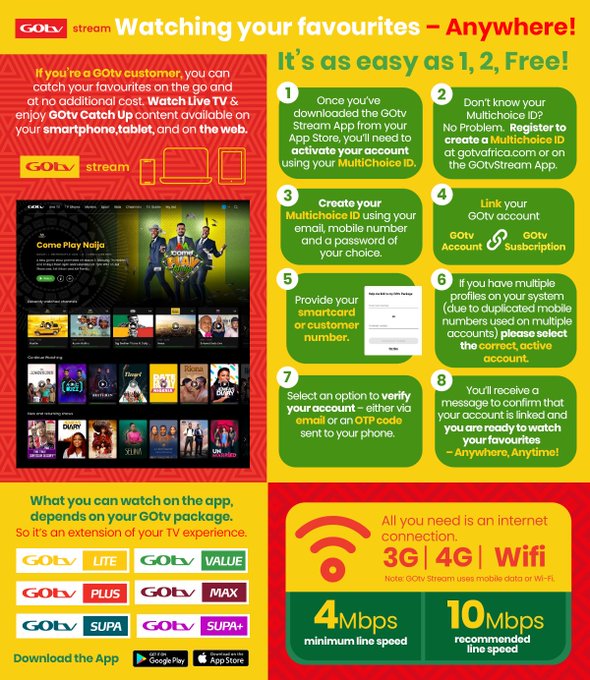
- A stable internet connection of at least 4 -10 Mbps
- An active GOtv subscription
- A valid Email address linked to your subscription
- A Multichoice ID
- A compatible device (Android, Apple, tablet or PC)
You can register up to four devices with your account, but only stream on one device simultaneously.
See also How to Change DStv Package, Upgrade or Downgrade
Here’s how to sign up for GOtv Stream
These steps assume you have an active GOtv subscription.
- Go to https://gotv.stream or download the GOtv stream app from the Google Play Store or App Store.
- Click on Sign up.
- Register your email address and phone number.
- Create a strong password.
- Next, click on “Create Your Multichoice ID”.
- Click on “Link Your GOtv Account.”
- Enter your Decoder’s IUC number (check on the back of your decoder).
- An OTP code will be sent to the phone number or email address linked to your GOtv account.
- Enter the OTP code and finalize the registration.
- You can go ahead and link your streaming devices. Happy streaming!
Key Features of GOtv Stream
- GOtv Stream is available in Malawi, Nigeria, Kenya, Uganda, Zambia, Mozambique, Ghana and Namibia.
- You can only watch the content linked to your GOtv package
- You cannot use the same DStv Stream email when registering for the GOtv stream. Both services require different email addresses.
- Casting is not available on the GOtv Stream app.
- You can create up to 6 profiles for different levels of your family members. You also have the option to manage and customise parental control for children’s profiles.
- This streaming service is not available on smart TVs.
- You cannot rewind or forward live TV.
- You can contact GOtv directly through the app’s Live Chat option by selecting “Settings” from the “More” menu.
Read also:
Gotv stream app needed
Not necessarily if you want to stream directly online through the gotv.stream portal.