

Safaricom Home Fibre provides you with the convenience of unlimited, reliable, and high-speed internet packages at home or the office at a reasonable cost. Once you subscribe, an installer will supply you with a Safaricom WiFi router that includes LAN ports, allowing you to start utilizing the service immediately.
Safaricom Home Fibre WiFi Packages and Prices
Safaricom offers several fiber home packages with a validity period of 30 days. These are Bronze, Silver, Gold, and Diamond.
Recently, to keep up with competition, Safaricom upgraded the customers packages for the same cost.
The Bronze package for instance was upgraded from 8Mbps to 15Mbps for the same price of KSh. 2,999 per month. The diamond package was enhanced from 100Mbps to 500Mbps for the same Ksh. 12,499.
Here are the updated prices of Safaricom WiFI fibre packages:
| Package | Speed | Cost per Month | Validity |
|---|---|---|---|
| Bronze | 15 Mbps | Kshs 2,999 | 30 days |
| Silver | 30 Mbps | Kshs 4,100 | 30 days |
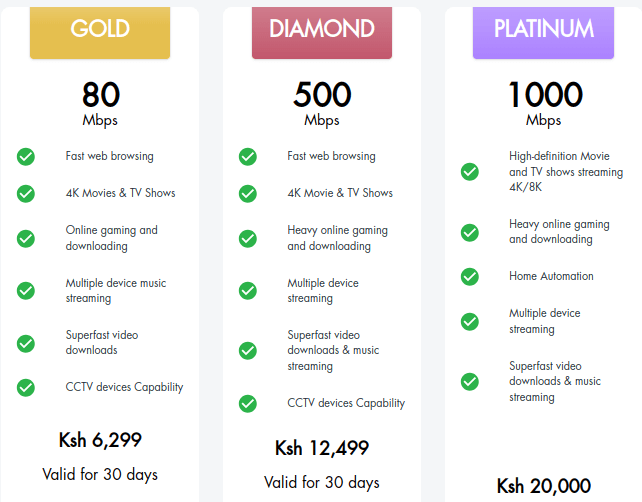
| Gold | 80 Mbps | Kshs 6,299 | 30 days |
| Diamond | 500 Mbps | Kshs 12,499 | 30 days |
| Platinum | 1000Mbps | Kshs 20,000 | 30 days |
You can buy or renew the fibre home package by dialing *400#. Payments are done 30 days in advance to avoid your connection being suspended.
In addition to any of the packages of your choice, you can opt to add the Internet Plus package at a cost of Ksh. 1,050. The Internet Plus package comes with 400 voice minutes, 5GB mobile data, and unlimited SMS.
Safaricom Home Fibre Coverage Areas, Request Connection
To check if your area is covered by Safaricom Home Fibre and request for connection, follow these steps:
- Dial *400# from your Safaricom line
- Select Get Safaricom Home Fibre
- Select your province
- Select your area if listed
- Enter Estate name
- Safaricom customer care will get in touch with you within 48 hours.
If your area is covered, the technical team from Safaricom Home fibre will help you create an account and advise you on how to pay for the subscription.

A Home or office WIFI internet router
The technicians will then visit you to install the WiFi router and give you the WiFi and LAN access details. This comes with no installation charges.
How to Pay Safaricom Home WiFi Via MPesa
You can pay for your Safaricom Home internet subscription via Mpesa paybill number 150501. Your account number is your Safaricom home account number.
You can also dial *400# and select Manage your Subscriptions. Select your package and proceed to pay via Mpesa.
Also read:
I think jitimu is a Best site for best information and notes