

In an effort to digitize services offered to teachers in Kenya, the Teachers Service Commission (TSC) has now implemented the issuance of teacher registration certificates online. As a registered new teacher in Kenya, you can now download your TSC digital registration certificate online.
This means that you don’t have to visit the TSC headquarters or offices to pick up your registration certificate. Additionally, teachers will no longer receive hard copies in the mail.
Before downloading your TSC registration certificate, there are steps you have to follow first to ensure your digital copy is successfully sent to your email.
Read: How to Apply for a TSC Duplicate Certificate
Here are the Steps followed to download your TSC digital certificate (new registrations):
Step 1: Check minimum requirements
Before embarking on the registration process, you have to ensure that you meet the TSC minimum requirements for teachers in Kenya.
Among these requirements is having scored a C+ and above in KCSE and a C+ in the two main teaching subjects.
Step 2: Avail all the documents required
TSC requires you to attach the following documents during the registration process:
For Kenyan Citizens
- Academic and professional certificates.
- Certificate of Good Conduct.
- KRA PIN certificate.
- GP 69 Medical form.
- One passport-size photo.
- Evidence of payment of a nonrefundable fee of KSh. 1050 through the citizen paybill number 222222 or bank deposit.
- Your National Identity Card.
For Non-Citizens
- A work permit from the Immigration Department.
- Academic and Professional Certificates obtained in Kenya or the country of origin (should be equated in Kenya).
- Certificate of Registration as a teacher to teach in the country of origin.
- Certificate of good conduct from the country of origin.
- A letter of clearance from the Ministry of Education Vetting Committee.
- Evidence of payment of a nonrefundable fee of KSh. 1050 through the citizen paybill number 222222 or bank deposit.
Step 3: Initiate Registration
- Visit the TSC online registration portal for new teachers
- Carefully and accurately fill in the required information. Ensure you provide a working email address where you will receive the digital certificate.
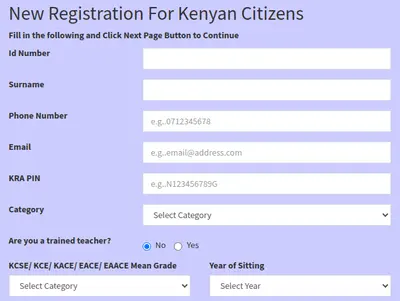
- Again, confirm your phone number, email address and other details.
- Click ‘next’ and upload the required documents.
- Continue through and upload scanned copies of all the required documents.
- Enter other details, including the Major and Minor subjects.
- Next, select the mode of payment, and type the pay-in slip number (or transaction code if by ecitizen).
- Confirm and submit the application.
- Track your registration status by logging in to the same portal.
Note that new applications are reviewed within 30 days upon meeting the minimum requirements and providing the relevant documents during registration.
Read: How to Register for AON Minet, Add Dependants, Upload Documents and Check Details
Step 4: Verify Email and Download Digital Certificate
When TSC has verified your registration (usually within 30 days), you will receive an SMS with a link and details on how to download your digital certificate.
- Click on the link in the SMS and follow the instructions to verify your email address and phone number.
- Enter the OTP codes sent to your phone and email, respectively, to verify both of them.
- Your digital certificate will be emailed to you.
- Click on the download link in your email inbox to download the copy.
- Proceed and print hard copies for filing purposes.
See also:
Need to download tsc registration certificate
Kindly help me to redownload my TSC certificate I lost the OTP number