

Absa Bank Kenya PLC online banking portal enables customers to manage their accounts and make transactions from home, office or anywhere in the world, with just an internet connection. When you register for Absa Bank internet banking, you also get the convenience of paying for your utility bills, DStv packages, Nairobi water and Sewerage, as well as making credit card payments from your PC, tablet or smartphone.
Furthermore, when you register for Absa Bank internet banking, you can get access to the Absa Bank app using the same login credentials and manage your account from the convenience of your smartphone or tablet.
See also: How to Download Timiza Loan App, Apply for Loan and get Approved
How to Register for Absa Bank Online Banking
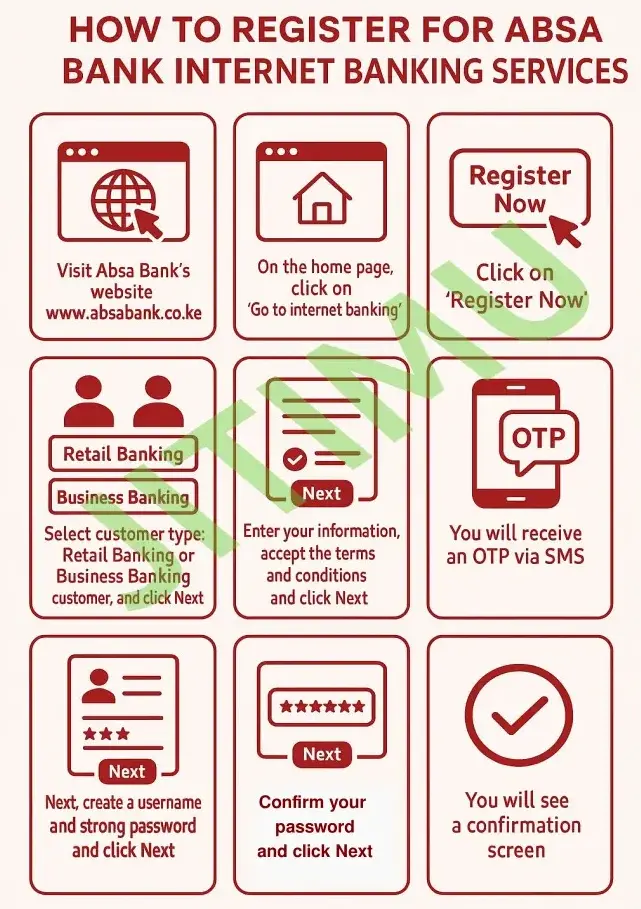
To register for Absa Bank internet banking services, follow these simple steps:
- Visit the Absa Bank’s website www.absabank.co.ke
- On the home page, click on ” Go to internet banking”
- Click on “Register Now”
- Select customer type; Retail Banking or Business Banking customer, and click Next
- Enter your information, accept the terms and conditions and click Next
- You will receive an OTP via SMS
- Enter the OTP and click Next
- Next, create a username and strong password and click Next
- You will see a confirmation screen
What Services are Available on ABSA Bank Internet Banking?
Services you can access through the Absa Bank online portal or app include:
- View, download and print proof of payment
- Request for a chequebook
- View your loan account details
- Transfer funds between your Absa accounts and other Absa accounts or even accounts at other banks (RTGS, PesaLink)
- View your account information
- View, download and print your statements
- View foreign exchange and interest rates
- Carry out foreign exchange transactions
- View your credit card statements
- Link your accounts (both credit card and additional bank accounts)
- Pay your utility bills, purchase airtime and load M-Pesa and Airtel Money
- Send and receive email to and from Absa
- Access your account 24/7 from anywhere in the world
- Debit card and one-time password (OTP) presence management
- Create a travel notice to enable your Absa cards for global transactions
You can also visit your nearest Absa Bank Kenya branch to help you with the online registration process.
Read also:
0 Comments